Cloud Desktop E-VDI is a concept that separates a PC desktop environment (Operating System & Applications) from a physical machine. The solutions transfer traditional Operating System & Application into an On-Demand Service so that it’s available for any user in any device.
Structure of Cloud Desktop
FEATURES
Easy in Maintenance
Zero Administrative Cost for PC
Flexible for Mobile Devices
Malfunction Free
Efficient in Resources Allocation
CLOUD MAINTENANCE
1. One click to upgrade/ prepare all desktops & programs in background
Easy to update all desktops in batch
Quick response to the teaching desktop change
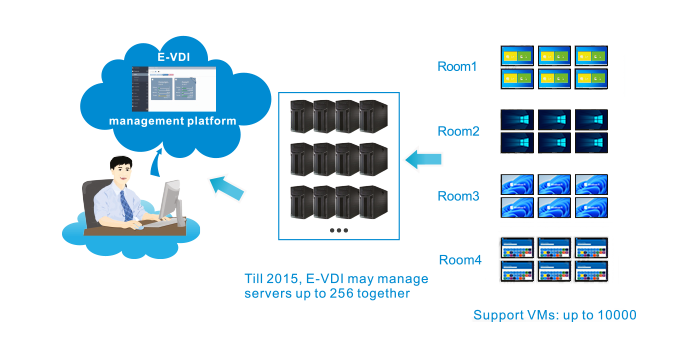
2. Centralized management of up to 256 E-VDI Serves
Multiple servers can be used in a platform
Servers from different locations can be management by a single platform
3. One console to manage all terminals
Login to desktop anywhere, anytime using any devices
Manage terminal hardware easily
DUAL DESKTOP MODE
Teaching/ Personal Desktop Auto restore for public desktop environment.
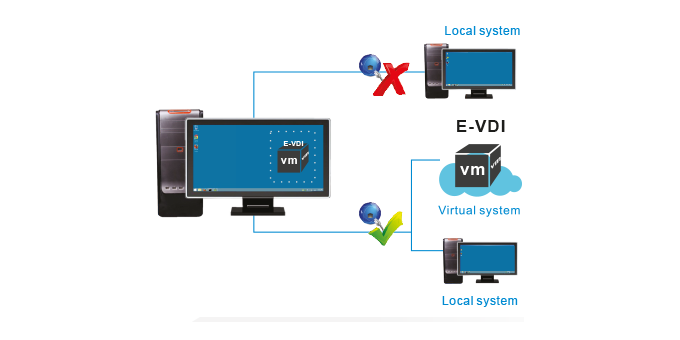
Switch between real/ virtual desktop at random it network is disconnected
Select teaching desktop according to course requirement
Hassle fee from virus attack, system crashed
Does not affect teaching even if network is disconnected or unstable
CLOUD DEPLOYMENT
Easily deploy 30 desktop less than a minute.
Time Saving
Simple & fast deployment
Support different terminal specs
Multiple OS desktops
CLOUD EXPANSION
Virtual desktop migration
Student can use the same desktop throughout his terms of study, no matter in which classroom
GREEN COMPUTING
Less hardware investment, energy saving, reduces TCO
Extend old computer life cycle
Cloud terminal is more energy saving, with its power consumption at only 15W, more quiet and green
CLOUD TEACHING
Scheduled desktops
Different teaching desktops can start automatically according to pre-set schedule
Boot/ plan virtual machines on time
E-VDI PLUS
E-VDI plus (OS-Easy Cloud Teaching) is OS-Easy E-VDI’s advanced version specially designed for education only. It is the world’s top virtual desktop broadcasting technology combined with interactive & network technology to achieve classroom interaction between teacher and students’ virtual desktops.
FEATURES
Screen Broadcast
Display teacher's machine images to students
Remote Monitor
Real-time monitoring for students desktop activities
Video Teaching
Broadcast video file to students
Rollcall
Check students attendance list
Collect/ Transfer File
Teacher transfer/ collect files to/ from students easily
Online Camera
Transfer live camera from teacher's pc to students